The Heal Workflow
Workflow name: ``heal``
Workflow description: Reinstalls the whole subgraph of the system
topology by applying the uninstall and install workflows’ logic
respectively. The subgraph consists of all the node instances that are
contained in the compute node instance which contains the failing node
instance and/or the compute node instance itself. Additionally, this
workflow handles unlinking and establishing all affected relationships
in an appropriate order.
Workflow parameters:
- ``node_instance_id``: The ID of the failing node instance that needs healing. The whole compute node instance containing (or being) this node instance will be reinstalled.
Workflow high-level pseudo-code:
- Retrieve the compute node instance of the failed node instance.
- Construct a compute sub-graph (see note below).
- Uninstall the sub-graph:
- Execute uninstall lifecycle operations (
stop,delete) on the compute node instance and all it’s contained node instances [1]. - Execute uninstall relationship lifecycle operations (
unlink) for all affected relationships.
- Execute uninstall lifecycle operations (
- Install the sub-graph:
- Execute install lifecycle operations (
create,configure,start) on the compute node instance and all it’s contained nodes instances. - Execute install relationship lifecycle operations
(
preconfigure,postconfigure,establish) for all affected relationships.
- Execute install lifecycle operations (
| [1] | Effectively, all node instances that are contained inside the compute node instance of the failing node instance, are considered failed as well and will be re-installed. |
A compute sub-graph can be thought of as a blueprint that defines only nodes that are contained inside a compute node. For example, if the full blueprint looks something like this: {{< highlight yaml >}} …
node_templates:

webserver_host: type: cloudify.nodes.Compute relationships: - target:
floating_ip type: cloudify.relationships.connected_to

webserver: type: cloudify.nodes.WebServer relationships: - target:
webserver_host type: cloudify.relationships.contained_in

war: type: cloudify.nodes.ApplicationModule relationships: - target:
webserver type: cloudify.relationships.contained_in - target: database
type: cloudify.relationships.connected_to

database_host: type: cloudify.nodes.Compute

database: type: cloudify.nodes.Database relationships: - target:
database_host type: cloudify.relationships.contained_in

floating_ip: type: cloudify.nodes.VirtualIP
...
Then the corresponding graph will look like so:
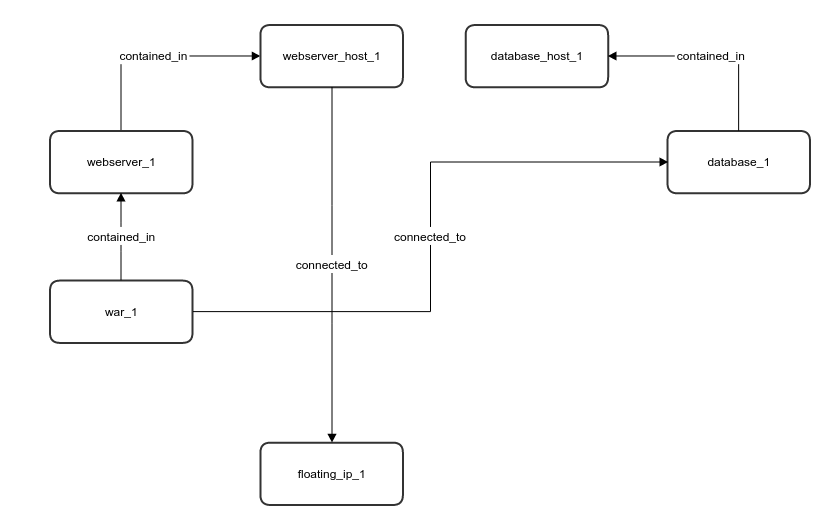
Blueprint as Graph
And a compute sub-graph for the ``webserver_host`` will look like:
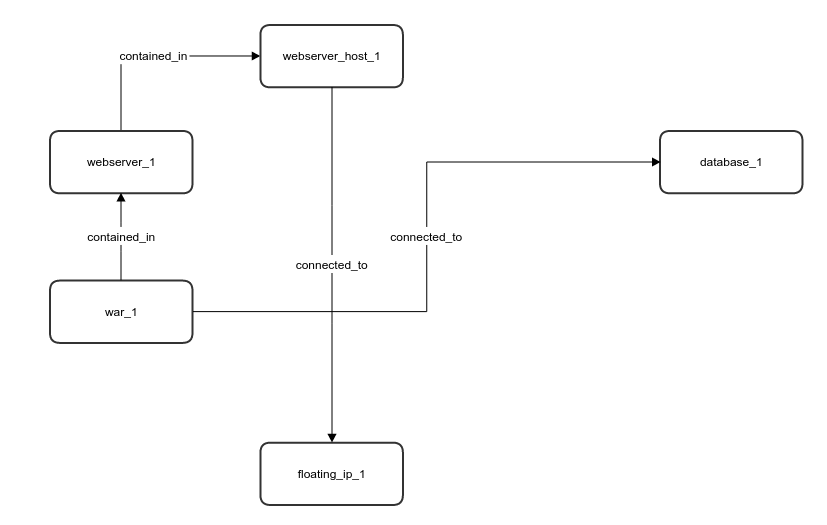
Blueprint as Graph
NOTE: This sub-graph determines the operations that execute during the workflow execution. In this example:
- The following node instances will be re-installed:
war_1,webserver_1andwebserver_host_1. - The following relationships will be re-established:
war_1connected todatabase_1andwebserver_host_1connected tofloating_ip_1.